
Recent Changes shows which pages have recently changed.
Click on the title link in the previous paragraph. Here's what I saw when I did. (You'll see something different.)
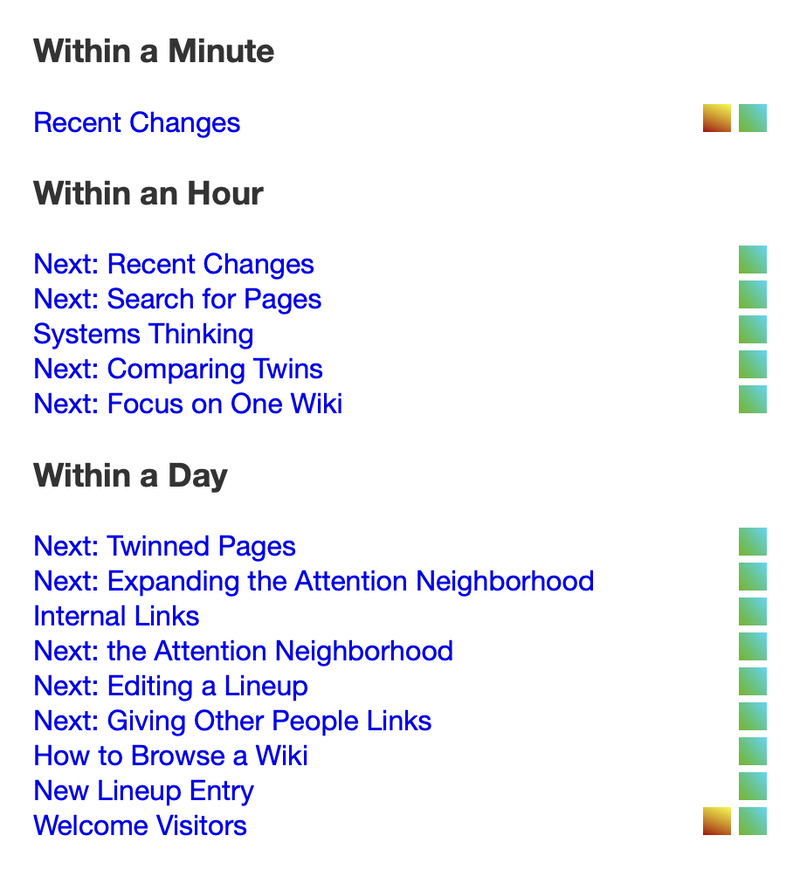
As of March 4, 2025
There are two things to notice.
* First, the names of pages with recent changes are shown. Note the one at the very bottom labeled "Welcome Visitors" in my image. It has two flags to its right, indicating there are two wikis in the neighborhood with a page of that name that has been changed recently. (The most recent is on the right.) When you see multiple flags on the line, you can hover over each to see the name of its wiki. If you then click on one of the flags, the latest version of that page on that wiki will be added to the lineup. If you click on the title link itself (like the title "Welcome Visitors"), and there are two or more flags on its line, it picks the newest (rightmost) one. (If there's only one, it picks that.)
* Second, notice there's no blue border around the page after this one. When you clicked on the Recent Changes title link at the top of this page, the wiki had to pick one of the ones in the neighborhood. It will always open the version on the wiki you started with (the "origin" wiki). Since the whole neighborhood is shown, it doesn't really matter which it had picked: you'd see the same changes if it'd used the other one. But I thought the lack of border might puzzle you.
Conventionally, there's a link to Recent Changes on the Welcome Visitors page. But if you're deep in a lineup, the easiest way to get there is to search for "Recent Changes" and click on the match.
---
At this point, you might want to **stop reading**. You probably have enough information to browse wikis happily. Only if you run into something puzzling would you want to finish the tutorial.
A neat thing is that, if you bookmark this page in your browser, you can return to this same place, with the same lineup, ready to proceed.
But if you want to continue...
Take a look at the number of pages in the neighborhood (in the bottom dark grey border).
Then click on Next: Expanding the Attention Neighborhood